Andrew Hamada
|
Using AI for Big, Strategic Amazon Projects
Guides & How-to
AI is genuinely good at ad hoc Amazon questions now. Drop in a spreadsheet, ask what happened to sales last month, get a reasonable answer. Where it still breaks down is the work that actually matters: AVN prep across a full catalog, validating Net PPM against three years of deductions, grading Amazon's forecast accuracy by product. These projects fail for a specific, fixable reason, and it has a name: the context window.
A context window is the maximum amount of information an LLM can hold and work with at one time. Everything counts against it: your prompt, attached files, instructions, memory, connected tools, and your data. Exceed it and the model rarely warns you. It just starts dropping data, skipping instructions, or predicting what the numbers should have been.
I've spent years running large Amazon analyses through AI, first as an early (and frequently disappointed) adopter, now as someone who builds data infrastructure for enterprise vendors. This guide covers the four techniques I use to control context and get reliable results from big strategic projects.
Context Windows Limit Your Analytical Scope
Think of context as AI's working memory. You and I can hold only so many things in our heads at once; past that point we need notes and a whiteboard. AI works the same way, except its whiteboard has a hard size limit and it won't tell you when you've filled it.
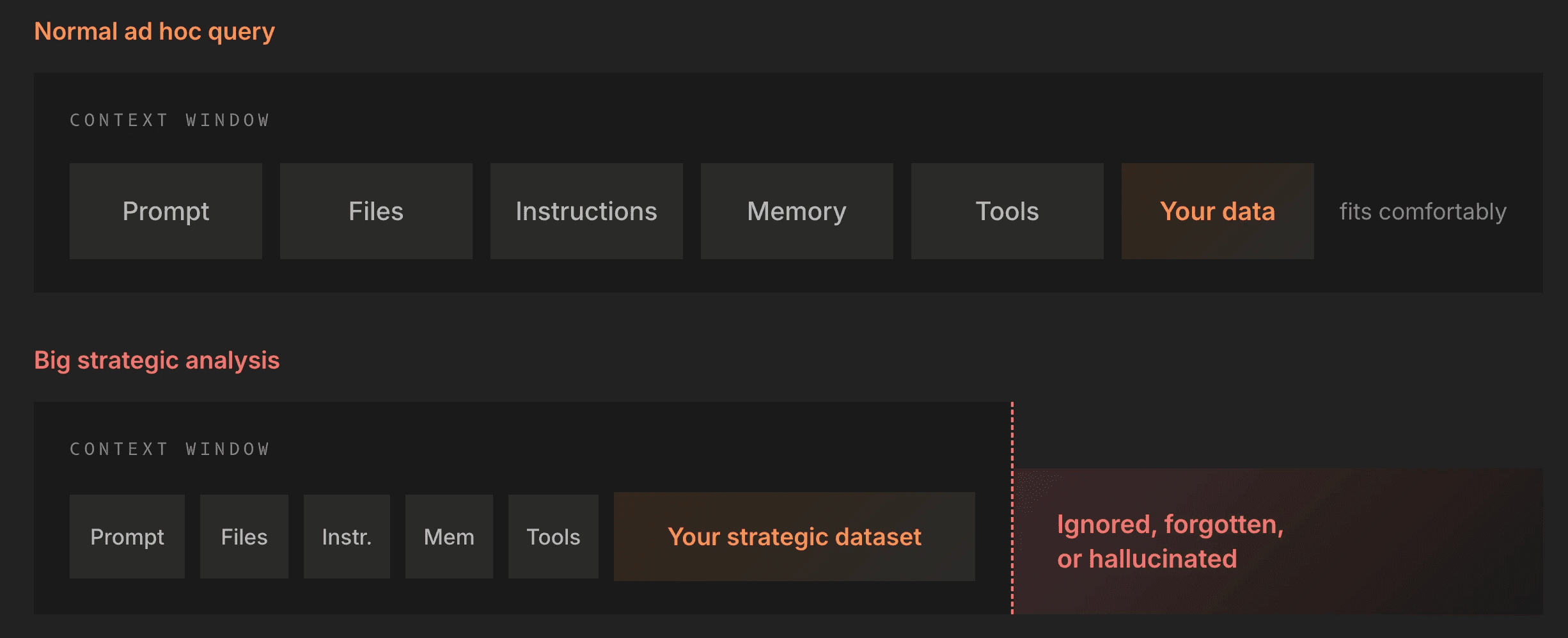
For a normal question, everything fits comfortably. For a big strategic analysis, your dataset blows past the limit, and the failure is quiet. The model might ignore part of your data. It might selectively apply your instructions or forget to use a connected tool. If you've ever wondered why AI seems to stop listening to a discrete, limited set of inputs, this is often the reason.
The stakes are concrete. If you ask AI to forecast demand across a large catalog and it silently ignores 20% of your data points, you get an answer that looks complete and isn't. You want the model to use the entire dataset or tell you it can't. Today, it does neither by default.
What a Million Tokens Actually Buys You
Every major AI platform now advertises a context window of roughly 1 million tokens. That number means nothing on its own, so here is the translation:
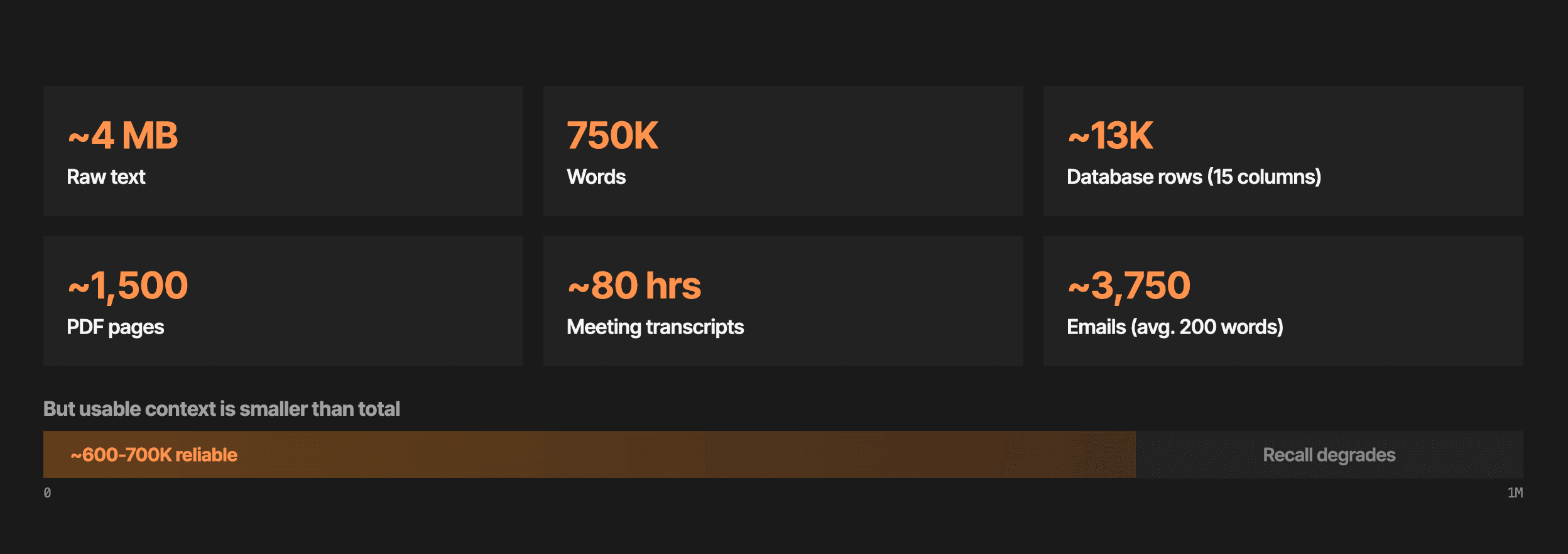
The database number is the one that should worry you. Around 13,000 rows at 15 columns sounds like a lot until you remember that a single year of daily, ASIN-level Retail Analytics data for a mid-sized catalog runs into the millions of rows. Excel's million-row ceiling frustrated you; AI's ceiling is far lower.
Two caveats make the real limit tighter than the headline number.
First, usable context is smaller than total context. In repeated testing, roughly 600,000 to 700,000 tokens of that million are actually reliable. Beyond that you hit recall degradation, where the model sometimes applies an input and sometimes doesn't. That inconsistency is worse than a hard failure, because you can't see it happening.
Second, the million-token figure applies to the API. Most business users work through the web and mobile apps, where the window depends on your subscription tier.
Your Subscription Tier Changes Your Context Window
Here is OpenAI's lineup as of June 2026, to give you a sense of how much this varies within a single product:
ChatGPT tier | Price per month | Context window |
|---|---|---|
Pro | $200 | 1,000K tokens |
Pro | $100 | 128K tokens |
Plus | $20 | 128K tokens |
Go | $8 | 32K tokens |
Free | $0 | 16K tokens |
The pattern holds across Claude, Gemini, Copilot, and Grok: full context lives at the $100 to $200 tiers, and the $20 tier most professionals actually use gets a fraction of it. A 128K window is roughly one-eighth of the advertised million.
One related trap: upload limits are not context limits. ChatGPT Pro accepts 512 MB uploads, but 4 MB of raw text already fills a million-token window. You will obliterate the context window long before you hit an upload cap, and the interface will happily let you do it.
Four Techniques for Controlling Context
Everything that follows comes down to one skill: deciding deliberately what goes into the window and what stays out.
Curate and edit context deliberately.
Use purpose-built documentation.
Move work upstream to non-AI systems.
Precompute views and chain analyses.
Curate and Edit Context Deliberately
You have far more control over context than the chat box suggests. The techniques here sound obvious individually; the value comes from doing them on purpose and revisiting them regularly.
Limit input data. If you're ex-Amazon like me, your mental model is to pull the most granular data possible (ASIN by day, by program, by distributor view, by country) and pivot your way to any insight. That works with Amazon's compute resources. It fails completely inside a context window. Instead of the whole catalog, take your top 10%. Instead of three years of daily history, take the last couple of quarters. Match the data to the question.
Supply business context up front. If you don't define what you mean by shipped COGS, the model burns context trying to figure it out: vendor or seller, sell-in or sell-out, PO revenue or PO cost. Every round of disambiguation gets anchored into the conversation permanently. Give it your definitions for the terms you'll actually use, and it gets sharper and cheaper at the same time.
Edit AI's memory. Tools like Claude let you view and edit what the model remembers about you, in plain language. I recently opened mine after months of neglect and found it cluttered with woodworking projects and other personal junk that Claude was weighing every time I asked for help with a strategy doc. I told it to drop everything personal and stay focused on Amazon topics, and it did. Memory is readable text, and editing it is as easy as reading it. I now check mine monthly.
Use projects. Projects (the name varies by platform) let you scope context to a workstream: one project for strategic data analysis, another for document writing, another for sales follow-ups, each with its own files, instructions, and memory. They also work for teams. A leader with deep Amazon experience can load seven years of gotchas and seeing-around-corners into a WBR project, and everyone on the team inherits that background without knocking on their door. It works in reverse too: the specialist whose Slack DMs are a permanent support queue can put that knowledge somewhere everyone can use it.
Create skills. A skill is a portable set of written instructions in a Markdown file that standardizes how the model approaches a task. If that sounds like the other items on this list, it is; the difference is portability. Skills can be shared, published, and installed from other people's work.
Use precise prompts. Early on, I hunted for the perfect mega-prompt, usually 14 paragraphs from some venture capitalist. Those prompts are expensive in context terms, and the people promoting token-hungry techniques often profit from token consumption. Start small, be specific, and iterate.
The keyword in this technique is deliberately. None of this is a one-time setup. Memory drifts, projects accumulate junk, skills go stale. Put a recurring reminder on your calendar and treat context like any other system you maintain.
Use Purpose-Built Documentation
For Amazon strategic analysis, generic web knowledge fails you. Anyone who has worked in the Amazon vendor world knows how much esoteric terminology there is and how hard it is to disambiguate at scale. Manufacturing versus sourcing view. Glance views that became featured offer page views. Contra-COGS values that are estimates rather than billed amounts. Left to guess, AI will guess wrong, confidently.
The fix is giving the model documentation built for the exact data it's working with:
Data dictionary. Field-level definitions, data types, keys, and valid values for every table in play. With a dictionary in context, the model stops guessing what distributor_view means and reads the answer.
Schema descriptions. How tables relate, what inherits from what, and how the data is governed. This is what lets AI write correct joins instead of plausible ones.
Domain documentation. The Amazon-specific and 1P-specific knowledge that doesn't live in any schema: which metrics are estimates, which reports have known bugs, what a healthy value looks like. This is the difference between a query that runs and an analysis that holds up.
We invest heavily in exactly this at Reason, and we publish it openly. Our data dictionary documents every field in every table we deliver, and our Help Center pages pair each dataset with business questions, validation guidance, nuances, and example SQL queries. When someone on my team writes a query against Retail Analytics sales data, the standing instruction is to include that specific page in context. You can do the same, whether or not you're a customer. Hand AI our data dictionary, tell it your schema might differ, and ask it to bridge. It will, and it can even map our documentation onto a competitor's tables or your own manual downloads. We published it that way on purpose.
This is also what makes questions like "why is my Net PPM off" answerable. Net PPM lives at the intersection of shipped revenue, shipped COGS, contra-COGS, and sales discounts, and Amazon's own definitions of those inputs are inconsistent across reports. Documentation that encodes those quirks is worth more to your AI output than any prompt technique.
Move Work Upstream to Non-AI Systems
This is the critical one. If a computation can happen outside the model, it should.
Try uploading three years of daily, product-level Retail Analytics sales into a chat and you'll hit the context wall immediately. Have the model write a SQL query against a database instead, and the wall disappears. The database does the computation on its own hardware, works through gigabytes of input, and returns a small result set that fits easily in context. AI waits patiently and burns no tokens while the query runs.
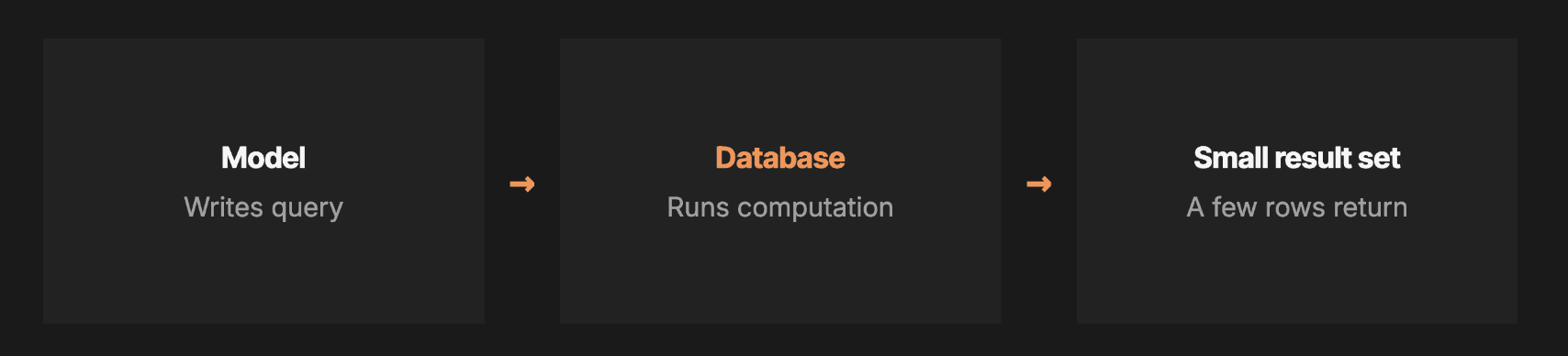
There's a second reason this matters beyond capacity: determinism. An LLM reads your data as text and interprets it with techniques that are non-deterministic, meaning the same inputs can produce different outputs on different runs. The result looks clean, but you can't recreate it. If you've ever handed identical inputs to a colleague, had them repeat your AI analysis, and gotten different numbers, this is likely why. A database computation is the opposite: exact calculation, every row counted, repeatable every time. When someone in a QBR asks how you got a number, "here is the query" is a defensible answer. "The AI read the spreadsheet" is not.
The same logic applies to how AI connects to Amazon data in the first place. Pointing a model directly at the SP-API means asking it to handle authentication, throttling at roughly 1 to 5 requests per second, 429 backoff, pagination, nested JSON parsing, schema mapping, cross-endpoint joins, and periodic re-authentication, all inside your conversation. Each step consumes context and adds a failure mode. A structured database carries none of that burden.

This is exactly the division of labor Reason was built around. We manage the direct SP-API and Data Kiosk connections for our customers (the authentication, the throttling, the silent gaps, the retroactive data revisions) and deliver the result as a clean database. Our MCP connects AI to that database, not to Amazon's APIs, which is why the rate limits and auth failures never enter your analysis. One caution if you're evaluating tools: an MCP that wraps the raw API still inherits every one of those API problems. The architecture underneath the MCP is what determines whether they go away. Amazon has released an SP-API MCP of its own and promised significant expansions at this month's partner summit in Seattle, including write actions like PO confirmation. Take the roadmap with an enormous heaping teaspoon of salt; we're still waiting on search query performance by ASIN for vendors, promised two years ago.
One more practical note, because I get this question in every session: having AI run Python inside the chat is better than having it do math as text, but I still push the deterministic computation fully outside the LLM whenever possible. SQL on a real server is a known problem with known error messages. You don't need hallucination risk stacked on top of your arithmetic.
If your company gives you nothing better than dragging files into a chat window, your ceiling on strategic analysis is low and fixed. This is also why I think internal BI and analytics teams are safer than the AI-displacement narrative suggests: your success as an individual AI user depends heavily on how well your company has resourced the systems underneath you. If you're an analyst reading this, feel free to quote me to your boss.
Precompute Views and Chain Analyses
The final technique resolves the tension in technique one. Limiting input data feels wrong when you're used to working with everything. You don't actually have to give up the granular data; you shrink what AI touches by precomputing derivative views for your most common questions.
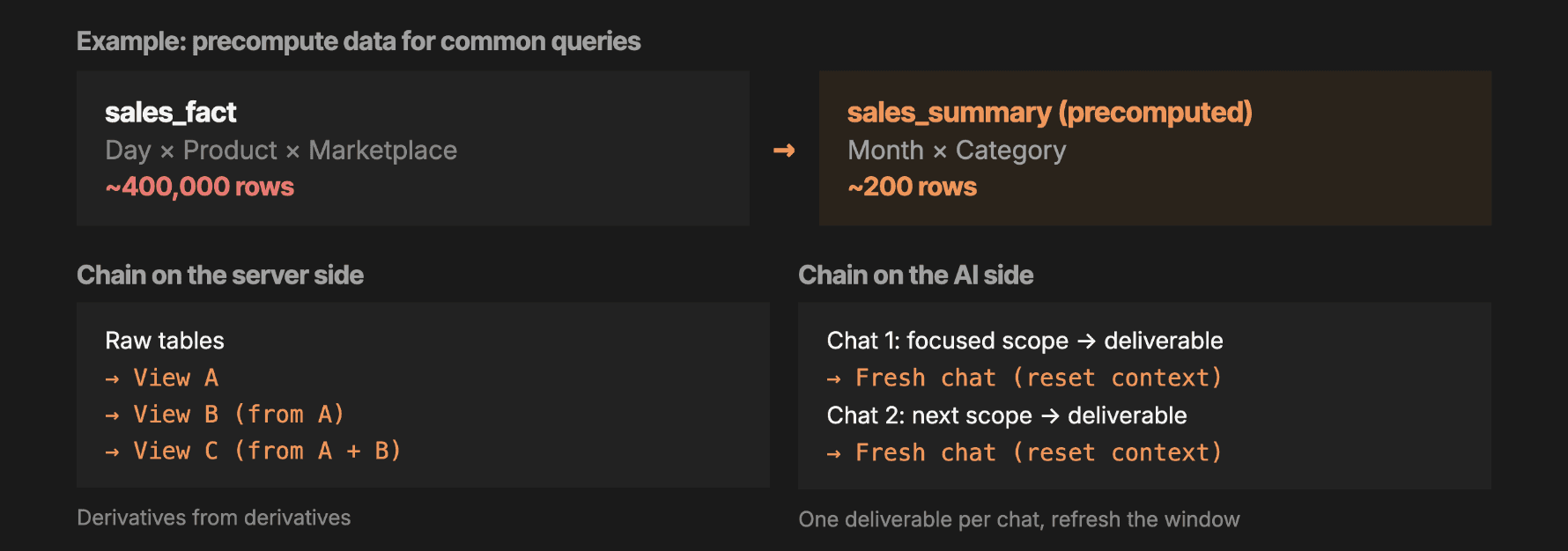
A daily sales fact table at product-by-marketplace grain might hold 400,000 rows. If your recurring question is monthly sales by category, precompute a summary at that grain and you're down to 200 rows. The daily data still exists for when you need it; AI just doesn't wade through it for routine questions. Queries get faster, context stays open, and the aggregation logic is computed once, deterministically, instead of improvised per conversation.
Chaining extends the same idea in two directions.
On the server side, build views from views. Start with the raw tables, derive View A (monthly sales by category), then View B (deductions by month), then View C combining both into monthly profitability. Each derivative is precomputed and ready to load, whether you're working in SQL Server, BigQuery, or anything else. This beats expecting AI to write a correct 100-line query with every join from scratch. For our customers we take this all the way to the structures people actually need: weekly and monthly variants, multi-marketplace rollups, full P&L statements, and PO statements, shaped as closely as possible to the final analysis.
On the AI side, chain conversations. When a chat hits its limit, the model stops responding or asks you to start over, and the new conversation remembers little. Work with that constraint instead of against it: drive each conversation to one specific deliverable, then carry only that deliverable and the minimum needed context into a fresh chat. You put down the context you've been hauling and bring forward only what the next step requires.
Putting All Four Techniques to Work
Here's what this looks like combined, from the live demo in our session. The question: which Retail Analytics forecast model has historically been the most accurate for our top-selling products?
This question would normally make AI barf. Answering it requires historical forecast data at low granularity, a definition of "top-selling," and actuals to compare against, all at once. The typical outcome is either a refusal or, worse, a confident answer invented from thin air. Ask where the number came from and the model will cheerfully admit it made it up.
With the techniques in place, the flow changes completely. Claude, connected through our MCP, pulls the data dictionary and schema to find the forecast tables. Because it has our Amazon documentation in reach, it knows what a forecast vintage is and chooses the vintage table, since the question is about historical forecasts. That table already includes shipped-unit actuals, precomputed, because we know forecast accuracy is a common analysis. It writes a SQL query you can inspect (technique three: the database does the computation), and returns a small result: the mean forecast under-predicts actual consumer demand by about 11% for this business, while the P70 forecast is nearly unbiased at 1.5% overstated.
Then the chain continues. Knowing P70 is the trustworthy signal, the next prompt builds directly on that result: predict Q3 purchase orders and flag surprises. The model pulls Q3 forecasts, compares against last year's actuals, and surfaces exactly the things a demand planner needs to investigate: aggressive growth projected across nearly every ASIN, nine new ASINs forecast with no year-over-year comparison, and one product whose projection skyrocketed far outside normal bounds.
Our MCP does only three things: it runs SQL, it connects to your dedicated database, and it makes our Amazon documentation readable to AI. Those three capabilities implement all four techniques, which is the point. Context control is an architectural decision, and we made it the foundation, so the analysis above works the same in a web chat or through the API, on your Amazon data or your omnichannel data at scale.
Managing Context Is the Skill That Matters
The models will keep getting bigger windows, and the marketing will keep getting louder. The durable skill is knowing what belongs in the window at all: curate context deliberately and revisit it on a schedule, feed AI documentation built for your data, push computation upstream to systems that count every row, and precompute the shapes your recurring questions need.
If you want to start today, take our public data dictionary and Help Center documentation and hand them to your AI tool of choice. They're free, they work with your own downloads or other platforms' schemas, and they'll make your next Amazon analysis noticeably sharper. And if you'd rather skip straight to the architecture that handles all of this for you, book a demo. You'll meet directly with an ex-Amazon leader, not an SDR, and we'll run your actual data questions in the first conversation.
Frequently Asked Questions
What is an AI context window? A context window is the maximum amount of information a large language model can process at one time, measured in tokens. It includes your prompt, uploaded files, instructions, memory, connected tools, and data. When a conversation exceeds the window, the model drops or ignores the excess, usually without warning.
How much data fits in a 1 million token context window? Roughly 4 MB of raw text, 750,000 words, 13,000 database rows at 15 columns, 1,500 PDF pages, 80 hours of meeting transcripts, or 3,750 average-length emails. In practice only about 600,000 to 700,000 tokens are reliably recalled, and most consumer subscription tiers provide far smaller windows than the advertised maximum.
Why does AI give different answers to the same data question? LLMs read data as text and process it non-deterministically, so identical inputs can produce different outputs across runs. Moving the computation to a database or script makes the calculation exact and repeatable. This is the single most important change for analyses you need to defend in a negotiation or business review.
Can AI analyze large Amazon vendor datasets directly? Not by uploading them. Full-catalog, multi-year Retail Analytics data exceeds any current context window. The working pattern is to connect AI to a database through an MCP so the model writes queries, the database computes over the full dataset, and only small results enter the context window.